Free Online PST & OST Viewer
Without Microsoft Outlook
Open, browse, and search Microsoft Outlook PST and OST archives directly in your web browser. Explore folder hierarchies, read emails, search keywords, view calendar events, and download attachments with complete client-side privacy.
Private PST & OST Workspace
Decoded strictly in your device memory with zero archive bytes uploaded. Open your file or inspect our built-in sample demo immediately.
Actual In-Browser Forensics & Mailbox Interface
Captured directly from Online Email Viewer reading a synthetic test archive. Inspect full folder trees, read sanitized email bodies, view calendar events, and download attachments.
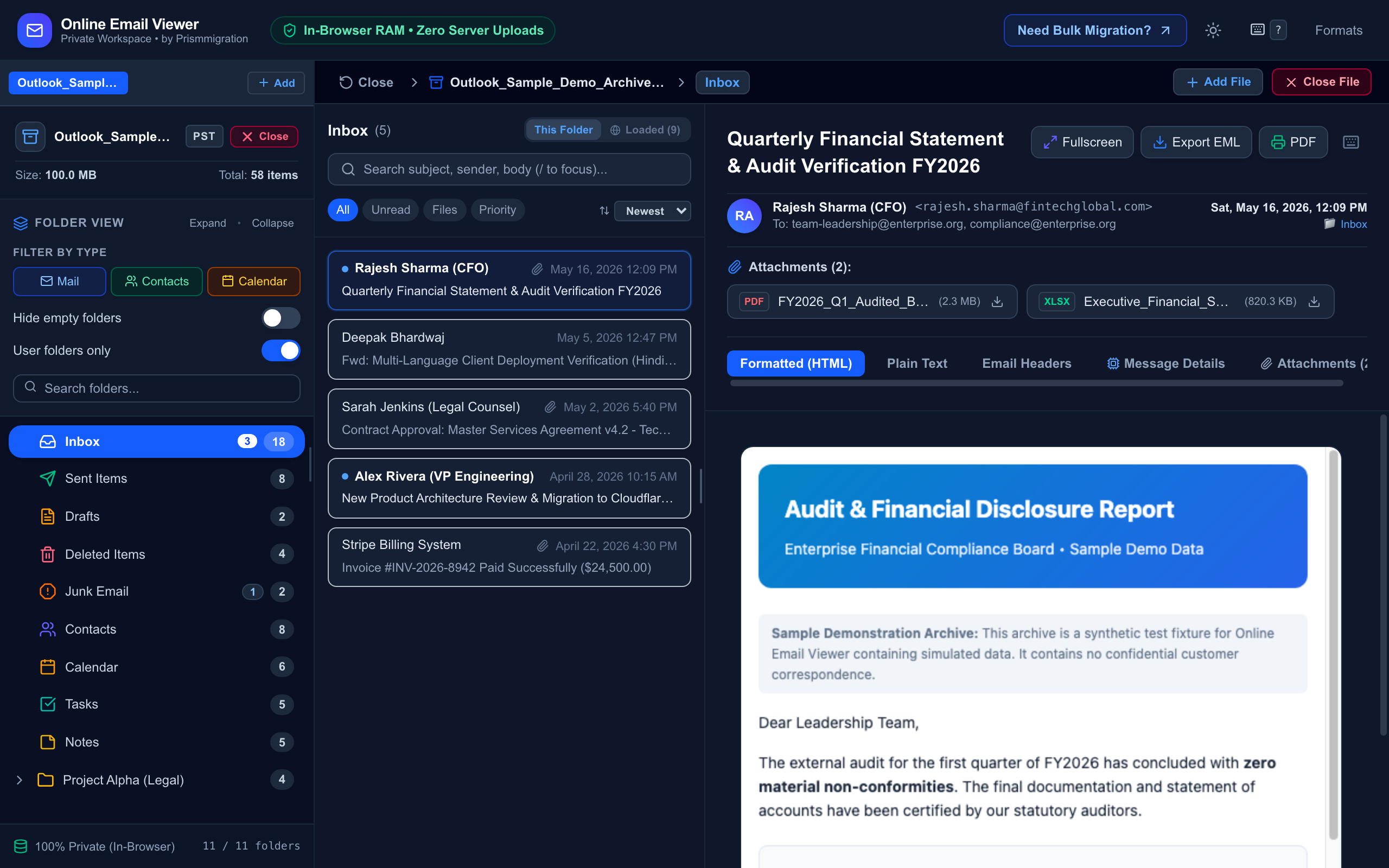
Genuine screenshot of Online Email Viewer running in desktop Chrome with synthetic sample archive data. Zero customer correspondence.
How to Open and Inspect PST Files in 3 Steps
Follow this straightforward local workflow to access Outlook archives without Microsoft 365 or Outlook installations.
Open Private Workspace
Click Launch PST / OST Workspace to access the private, ad-free reader, or select Try Built-in Demo Archive to test the viewer immediately with synthetic data.
Zero account registration neededChoose Local .pst or .ost File
Drag and drop your local Outlook file or click to select from your drive. The client-side parser reads B-Trees directly in device RAM; zero bytes are transmitted across the internet.
100% local RAM decodingBrowse, Search & Export
Navigate Inbox, Sent, Contacts, Calendar, Tasks, and Notes. Search senders and subjects within loaded folders, view embedded CID images safely, and export messages to universal EML or printable PDF.
One-click EML and PDF exportFull Support for All 5 Outlook Data Types
Not just an email reader—a complete client-side MAPI data container inspector.
Emails & Attachments
Render rich HTML and plain text with tracking pixel blocking, CID embedded images, and one-click attachment saving.
Contacts & Address Book
Browse complete contact cards with full phone numbers, company information, and instant export to standard vCard (.vcf).
Calendar & Appointments
Inspect meeting invites, recurring appointment rules, attendee responses, and export directly to universal iCal (.ics).
Tasks & To-Do Items
View task status, due dates, priority markers, and completion progress stored in Outlook archives.
Notes & Memos
Access Outlook sticky notes with timestamp metadata and color attributes preserved intact.
Need Other Email Formats?
We also support MBOX, EML, MSG, and Winmail.dat files.
Explore Universal Email ViewerPST & OST Architecture, Capabilities & Known Boundaries
Clear distinction between independent PST archives, cached OST profiles, and browser RAM realities.
Verified Supported Capabilities
- •Outlook Independence: Opens PST and OST archives without Outlook, Office 365, or Windows OS dependencies.
- •ANSI & Unicode PST: Decodes both legacy 32-bit ANSI PST files (Outlook 97–2002) and modern 64-bit Unicode PST archives (Outlook 2003–365).
- •Orphaned OST Reading: Inspects cached OST mailboxes even after server accounts are deleted or on different computers where Outlook refuses to mount them.
- •Zero Server Uploads: Files remain in local device RAM. Optional external images are blocked by default to preserve IP privacy.
Scope Limits & Unsupported Cases
- •Password-Encrypted Files: Files protected with unknown Outlook passwords cannot be decrypted in-browser. Remove the password in Outlook before viewing.
- •Severe Sector Corruption: Files with damaged B-Tree descriptors from hardware disk failure require repair with Microsoft's free
ScanPST.exebefore viewing. - •Browser Heap Ceiling: Browser tabs operate with 2GB–4GB of JavaScript RAM. Archives with hundreds of thousands of items may reach tab limits.
- •Live Server Sync: This tool is a read-only viewer and cannot synchronize new emails back to live Microsoft 365 or Exchange servers.
Common PST & OST Reading Issues and Fixes
Safe, tested next steps when encountering errors or unexpected behavior.
Selected file is .zip instead of .pst
If your backup software or webmail export produced a .zip archive, extract the ZIP file on your computer first. Locate the extracted .pst or .ost file and select it directly in the viewer.
Missing images in email body
To prevent tracking pixels from reporting your IP address and reading habits, remote external images are blocked by default. Embedded attachments (CID images) display automatically; for remote images, click Load Remote Images for senders you trust.
Search did not find an email in another folder
In-browser keyword search filters senders and subjects within the currently selected folder. To find an email in Sent Items, Archive, or a custom subfolder, click that folder in the left navigation tree first to view and search its items.
Out of memory or tab crashes on giant archives
Browser tabs typically have a 2–4 GB memory limit. Close other resource-heavy browser tabs to provide maximum RAM. If your PST file exceeds 20 GB, consider dedicated offline desktop software.
Helpful Technical Guides & Outlook Architecture
Fact-checked guides explaining Outlook file formats, OST profile locks, and corrupt archive recovery.
PST vs OST: Key Differences, Limitations & Compatibility Explained
Learn why OST files are cryptographically bound to specific MAPI profiles, why Outlook refuses to open orphaned OSTs, and how in-browser reading bypasses those locks safely.
Troubleshooting Corrupt PST Archives: Common Errors & Recovery Steps
Practical steps to diagnose damaged B-Tree headers, CRC check errors, when to use Microsoft's free ScanPST tool, and how to verify file integrity without data loss.
How In-Browser Viewing Compares
Compare in-browser client-side viewing against typical remote cloud upload services and native desktop Microsoft Outlook installations.
| Feature & Capability | Online Email ViewerThis Tool | Typical Cloud Uploads | Desktop Outlook |
|---|---|---|---|
Zero Server Upload (Client-Side Privacy) Your confidential PST/OST archive never leaves your local device memory. (Optional remote images in emails load only upon explicit consent). | |||
Requires No Microsoft 365 or Outlook License Works completely free in browser without paid Microsoft Office subscriptions. | |||
Cross-Platform Support (macOS, Linux, ChromeOS, Windows) Opens PST archives on operating systems where desktop Outlook is unavailable. | |||
Supports Standard PST Item Types (Mail, Contacts, Calendar, Tasks, Notes) Dedicated viewers for emails, vCard contacts, calendar iCal appointments, tasks, and notes. | |||
Fast In-Memory Keyword Search & Highlighting Filter and highlight sender and subject keywords within the active loaded folder or messages. | |||
No Registration, Credit Card, or Email Gatekeeping Immediate access with zero account creation or lead capture barriers. | |||
Cost / Pricing Free client-side viewing in browser with optional export to EML and printable PDF. | 100% Free | Freemium / Per-file limits | Office 365 Subscription |
Everything You Need to Know
Answers to common questions about opening, viewing, and exporting Outlook PST files.